
In any real-world application, handling data externally—outside of memory—is crucial. Whether you’re storing logs, user input, or configuration files, File Streams in C++ allow you to seamlessly interact with files.
With the expert guidance of Kamlesh Singad at Code With Kamlesh, this blog simplifies Strings & File Handling by diving deep into file streams using ifstream, ofstream, and fstream.
What Are File Streams?
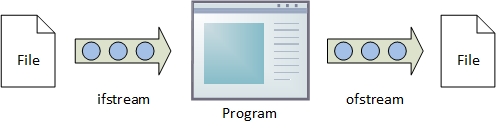
A file stream is a mechanism in C++ that connects your program with an external file. It works like a flow of data:
- Input File Stream (ifstream): Read data from files
- Output File Stream (ofstream): Write data to files
- File Stream (fstream): For both reading and writing
Also Read: Conditional Statements in C/C++: Mastering if, else if, and switch-case

Why Use File Streams in C++?
C++ file streams offer:
- Type safety and error handling
- Object-oriented approach to file I/O
- Built-in support for strings and formatted data
- Easier syntax compared to C’s FILE pointer method
Understanding the <fstream> Library
Include this in your program:
#include <fstream>
It gives access to three classes:
ifstreamofstreamfstream
All these classes inherit from istream, ostream, or both.
Opening and Closing Files
To open:
ofstream outFile("data.txt"); // Opens in write mode
ifstream inFile("data.txt");  // Opens in read mode
To close:
outFile.close();
inFile.close();
Checking File Opening Success
ifstream file("info.txt");
if (!file) {
    cerr << "Error opening file!";
}
Or using:
if (file.is_open()) {
    // proceed
}
Also Read: Operators in C/C++: Arithmetic, Logical, Relational & Bitwise

Writing to Files Using ofstream
ofstream file("output.txt");
file << "Welcome to File Streams in C++!" << endl;
file.close();
Reading from Files Using ifstream
ifstream file("output.txt");
string line;
while (getline(file, line)) {
    cout << line << endl;
}
file.close();
Using fstream for Both Reading and Writing
fstream file("data.txt", ios::in | ios::out);
file << "Hello, Kamlesh!" << endl;
file.seekg(0);
string line;
getline(file, line);
cout << "Read: " << line << endl;
file.close();
File Opening Modes
| Mode | Description |
|---|---|
ios::in | Read |
ios::out | Write |
ios::app | Append |
ios::trunc | Truncate existing |
ios::binary | Binary file |
Reading Word by Word / Character by Character
string word;
while (file >> word) {
    cout << word << endl;
}
Or:
char ch;
while (file.get(ch)) {
    cout << ch;
}
Formatted Output with ofstream
#include <iomanip>
file << setw(10) << left << "Name" << setw(5) << "Age";
File Positioning with seekg and seekp
file.seekg(0);         // Move to beginning
file.seekp(ios::end);  // Move to end for writing
Also Read: Understanding Data Types and Variables in C/C++
Error Handling with File Streams
if (file.fail()) {
    cerr << "File operation failed.";
}
For exception-based:
file.exceptions(ifstream::failbit | ifstream::badbit);
try {
    file.open("data.txt");
} catch (ifstream::failure& e) {
    cerr << "Exception opening file: " << e.what();
}
Practical Example: Student Record System
struct Student {
    int roll;
    string name;
};

void writeStudent(Student s) {
    ofstream file("students.txt", ios::app);
    file << s.roll << " " << s.name << endl;
    file.close();
}

void readStudents() {
    ifstream file("students.txt");
    Student s;
    while (file >> s.roll >> s.name) {
        cout << s.roll << " - " << s.name << endl;
    }
    file.close();
}

FAQs
What’s the difference between ifstream and fstream?ifstream is for reading only, while fstream supports both reading and writing.
How do you open a file for appending?
Use ofstream file("log.txt", ios::app);
What happens if you don’t close a file?
It may lead to memory leaks or data not being written properly.
Can I use strings with file streams?
Yes, you can easily read and write std::string with streams.
How do I check if a file exists in C++?
Attempt to open it with ifstream. If file.fail() is true, it doesn’t exist.
Is it better to use fstream over C’s FILE?*
Yes, fstream is safer, more flexible, and C++-oriented.
Conclusion
With ifstream, ofstream, and fstream, C++ offers an intuitive and powerful system for handling files. By learning through examples provided by Kamlesh Singad at Code With Kamlesh, you’re now capable of integrating Strings & File Handling with modern C++ practices.
Keep experimenting and build real-world applications like loggers, file readers, and database systems using file streams!


